You have decided to leave. Fine — but "which tracker is best" has no answer until you finish the sentence: best for what you are leaving over.
Six reasons account for almost all of it. Find yours, and the shortlist is one or two names long.
| You are leaving because | Move to | Why |
|---|---|---|
| The bill is too big for what you send | depends on what you send — see the numbers | under 10k we are $12 against Qliker's $45; at 1.5M, RedTrack is $79 |
| You cannot tell which clicks were real |  ClickLookup | a score on every click, kept and exportable |
| You have outgrown the top plan |  RedTrack ·  Binom | $79 flat, or a licence with no ceiling |
| You want to pay nothing while you test |  BeMob ·  Peerclick | 100k events free — read the retention line |
| You need it inside your own systems | ClickLookup | documented REST API, keys and webhooks — webhooks on Growth, full API on Scale |
| You want to change as little as possible | ClickLookup | one-click import, and the same metric names |
"The bill is too big"
This is the most common reason and the one with the least obvious answer, because it flips depending on volume.
At Qliker Small — 15,000 clicks for $45 — you are paying $3 a thousand. Most accounts on that plan send nowhere near fifteen thousand, and if you are under ten thousand our Starter plan is $12. Between 150,000 and a million we are $99 against their $195. Between 100,000 and 150,000 they are four dollars cheaper than we are, and above a million and a half we do not sell a plan at all.
We wrote that out band by band in the best Qliker alternative by volume, and priced ten trackers at matched volumes in the full comparison.
Short version: under a million clicks, moving to us cuts the bill. Above a million and a half, do not move to us — move to RedTrack.
"I cannot tell which clicks were real"
This is the reason we exist, so treat the next paragraph accordingly and then go and check it in a free account.
Every click gets a quality score in the milliseconds before the redirect: the network the address belongs to, whether it has been seen before, whether the browser's story holds together, the country against the one you bought, how fast the visit followed the last one. Then the score is written down with the click, and the click is never deleted.
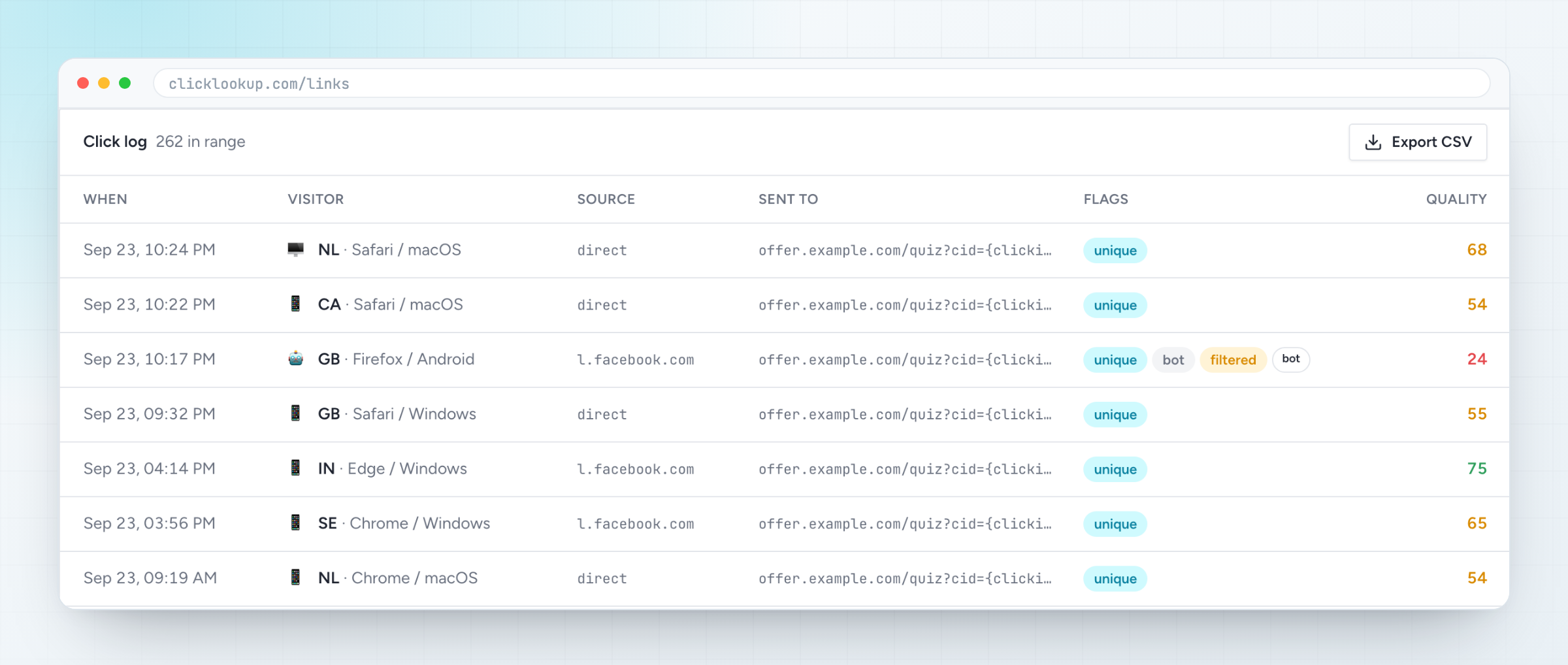
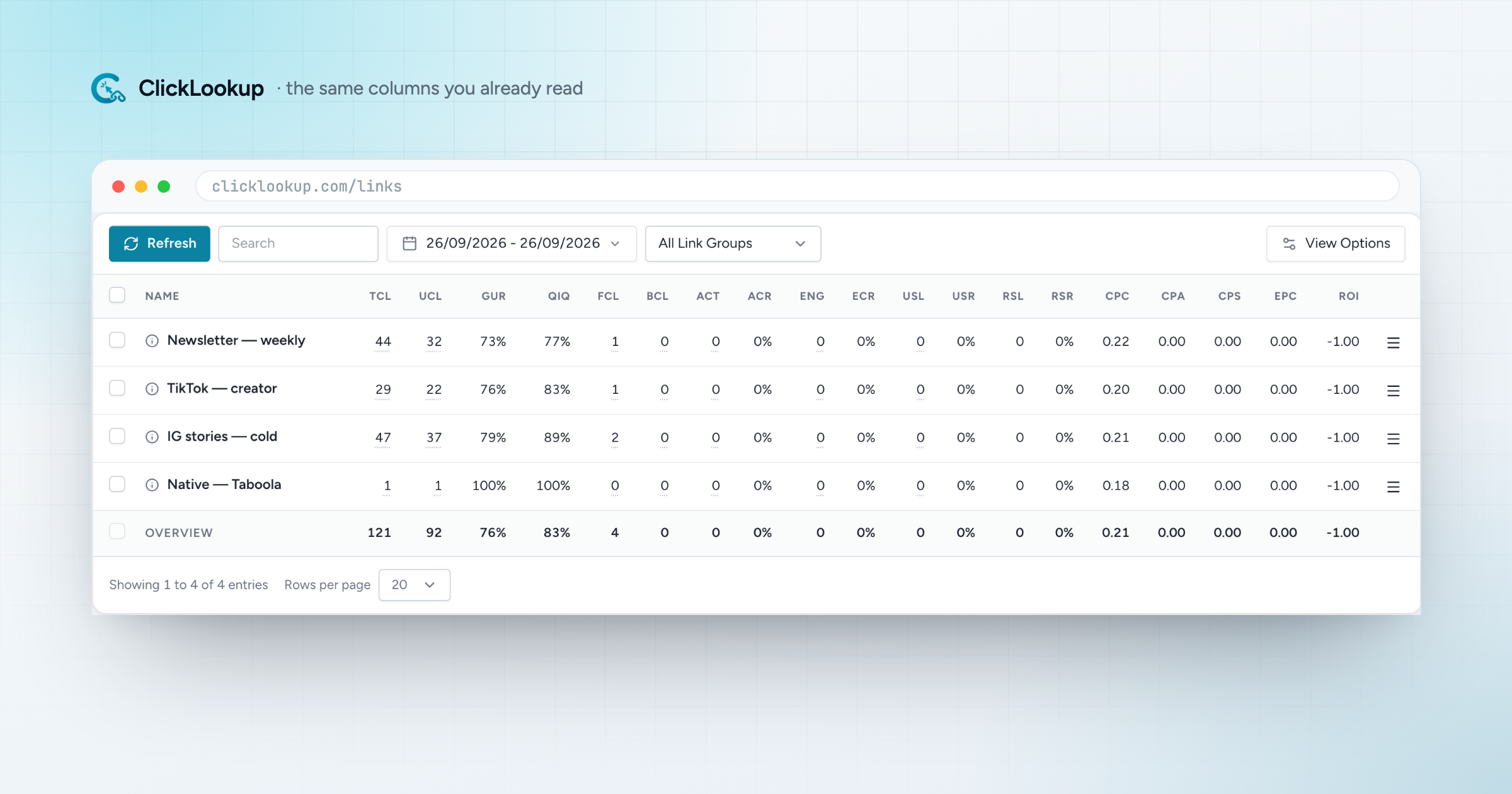
Third row down: a datacentre visit through a headless browser, flagged bot and filtered, scored 24. A verdict — blocked, not blocked — is something you can only argue about. A number with a timestamp and an ASN next to it is something you can send to whoever sold you the traffic, which is the entire point.
Then the unglamorous half: CSV export of the raw rows, not a summary. If a tool will not hand you the rows, you do not really have the data.
"I have outgrown the top plan"
Qliker stops at 1,500,000 clicks for $195. Above that, two honest answers, and neither is us — we stop at a million.
- RedTrack, $79 flat. Two million events on the entry plan and the same price whether you send one click or two million. One user at that price; five seats is $399.
- Binom, $149 self-hosted. No ceiling at all, unlimited users and domains, data on your own machine — and the hosting, updates and backups are yours too.
"I want to pay nothing while I test"
BeMob and Peerclick each give 100,000 events a month free. That is two hundred times our free allowance and there is no argument about the volume.
Read the retention line before you build on it, though: BeMob's free plan keeps one month of history, so a quarter-on-quarter comparison is impossible unless you export constantly. We do not have a free plan to offer against that. Ours is 14 days on 500 clicks a month with no card, and then it stops.
"I need it inside my own systems"
If the tracker is a place you have to log into, it is a bottleneck. Every plan carries an API key and CSV export. Webhooks for the events you care about arrive on Growth, and the full REST API and bulk import on Scale, so links, rotators, clicks and reports are reachable without opening the dashboard.
Most trackers on this list have an API of some kind. The thing worth checking before you commit is whether it is documented, whether it is on the plan you are actually buying, and whether the click rows come back through it — the third one is where most of them quietly stop.
"I want to change as little as possible"
This is the reason people put a migration off for a year, and it is the easiest one to solve.
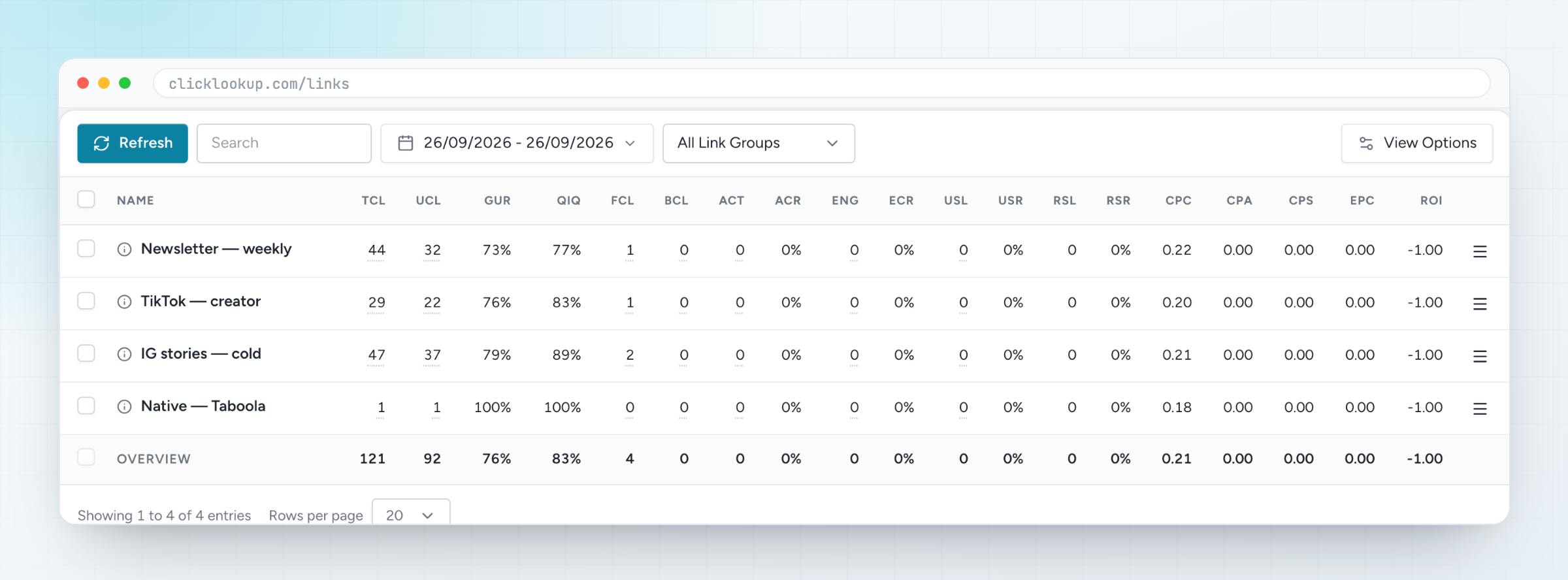
TCL, UCL, GUR, QIQ, FCL, BCL, CPC, EPC, ROI. Same abbreviations, same columns, same place. Nobody on your team has to relearn a job they already know how to do.
The settings come across too, translated rather than dropped:
| In Qliker | In ClickLookup |
|---|---|
| B / F / N filters | block / flag / off |
| mobile, iOS, geo, browser, system fields | editable rules |
| rotator modes | random, sequential, spillover, fulfilment |
| link groups | groups |
| custom domains | custom domains, pending verification |
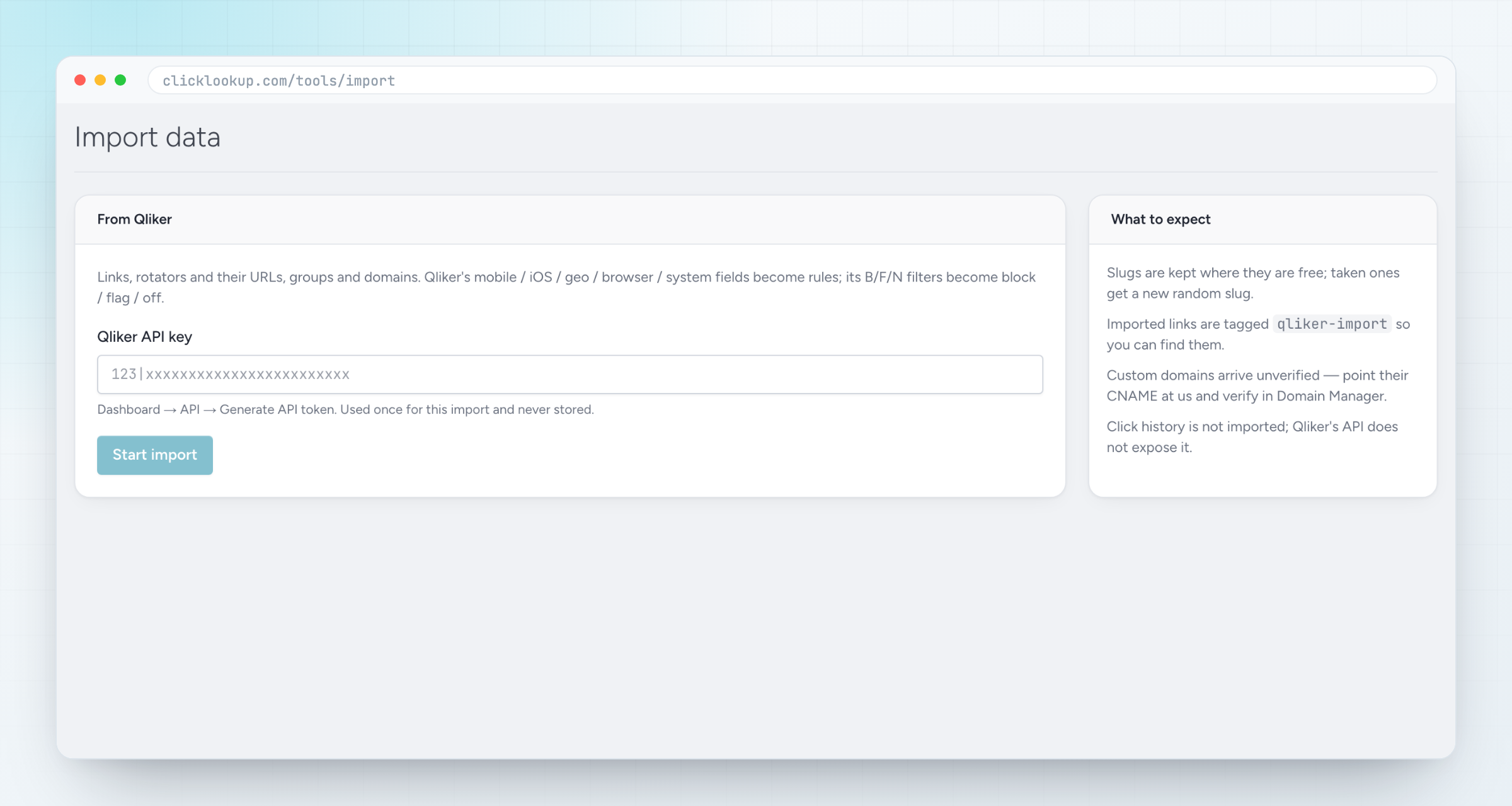
Paste an API key into Tools → Import and it reads your whole account before it writes anything, so a wrong key fails cleanly instead of leaving you half moved. Slugs are kept wherever they are free; imported links are tagged qliker-import so you can find the batch in one filter. About ten minutes.
Before you cancel anything
Do these four in this order, whichever tracker you land on.
- 1Export your click history. Qliker's API does not expose it, so no tracker can import it for you. Whatever you want to keep, pull it out as CSV first.
- 2Check where your links live. On your own domain they survive the move — add the domain at the new tracker and change the DNS when you are ready. On a shared tracker domain they cannot move at all.
- 3Run both for a fortnight. Old account keeps the history, new account starts collecting the day you point a domain at it.
- 4Compare the two logs, not the two dashboards. Same traffic, both tools. The one that tells you something you did not already know is the one to keep.
Frequently asked
What is the best Qliker alternative overall? There is no overall. Under 10,000 clicks, ClickLookup at $12 against $45. From 150,000 to a million, ClickLookup at $99 against $195. Above 1.5 million, RedTrack at $79. Testing with no budget, BeMob's free tier. The volume-by-volume breakdown has the numbers.
Will I lose my click history? Yes, wherever you go — Qliker's API does not expose it. Export before you cancel.
Will my tracking links break? Not if they are on your own domain. On Qliker's shared domain, they cannot be moved by anybody.
How long does the move take? The import is about ten minutes. Running both accounts for two weeks is the part worth not rushing.
Do I have to decide now? You get fourteen days on any plan, which is long enough for the test that matters: point one live link at it and see whether the log tells you something Qliker's does not.